Levi Gans
“Failed to fetch dynamically imported module” means the browser couldn’t load a code-split chunk, usually because a deploy replaced it. How to fix it in Vite, React and Vue, and how to see how many users hit it.
1TypeError: Failed to fetch dynamically imported module:2https://app.example.com/assets/Settings-Bx9a2kQd.js
The browser tried to load a JavaScript file through import() and got an error instead of a module. Apps built with Vite, React Router, Vue Router or SvelteKit split each route into its own file and load it on demand, so the error shows up when someone opens a page, not when the app starts. It’s the browser’s own message, not a bug in Vite.
The same error in each browser
| Browser or bundler | Message |
|---|---|
| Chrome, Edge | Failed to fetch dynamically imported module |
| Firefox | error loading dynamically imported module |
| Safari | Importing a module script failed. |
| webpack, including Next.js | ChunkLoadError: Loading chunk 123 failed. |
Search your error tracker for all four. They’re the same problem, and Safari’s message doesn’t include the file name.
Why it happens after a deploy
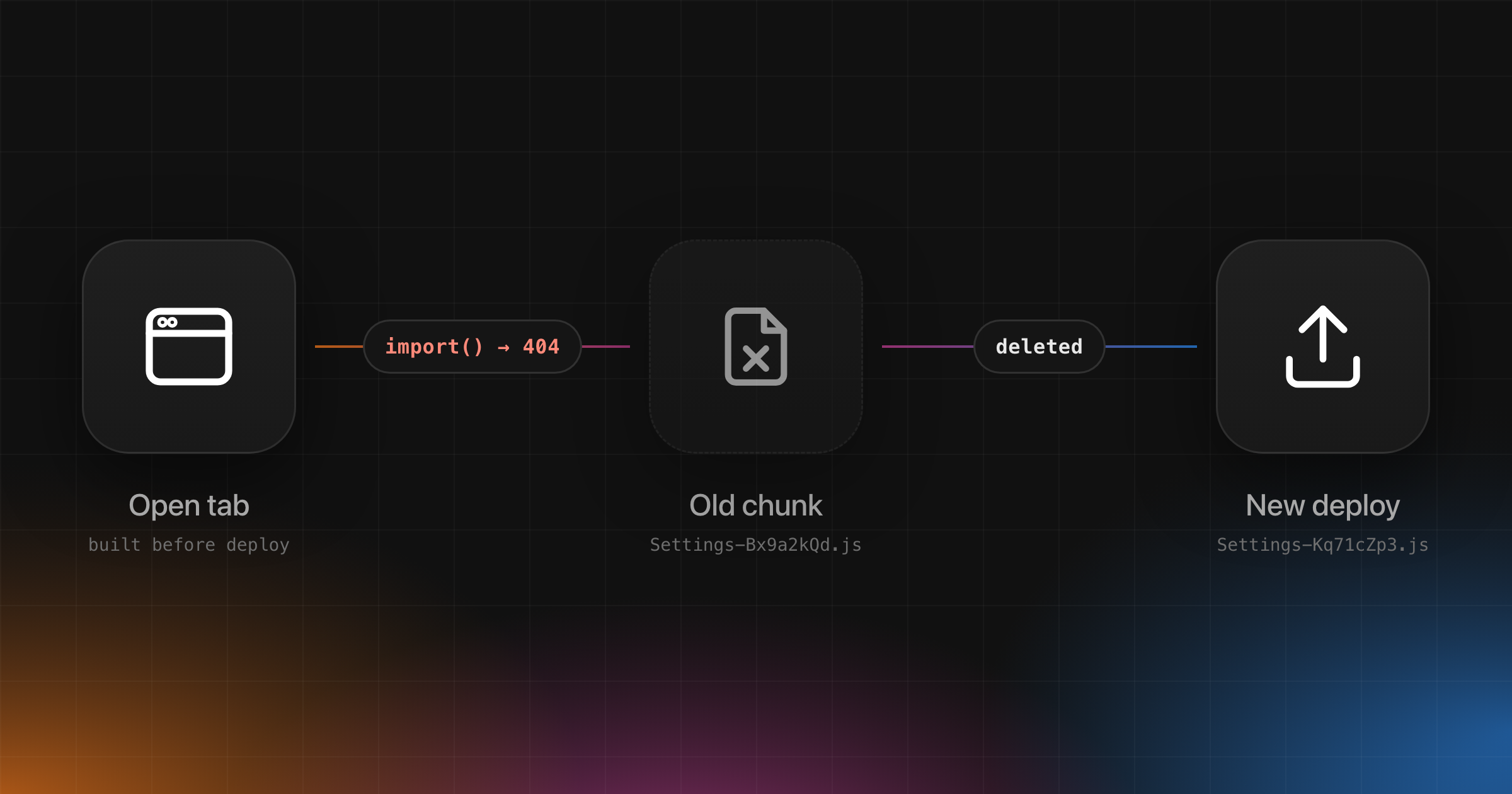
Most production cases follow the same steps:
- A user opens your app. The browser loads
index.html, which points to chunks with hashed names likeSettings-Bx9a2kQd.js. - You deploy. The build gives changed chunks new hashes, and your host deletes the old files.
- The user, still on the old tab, opens Settings. The browser asks for
Settings-Bx9a2kQd.js, the server returns a 404 or yourindex.htmlfallback, and the import fails.
That’s why it spikes for an hour after each release and then fades, and why “clear your cache” fixes it for one person. Other causes are rarer:
| Cause | How to tell |
|---|---|
| Old chunks deleted by a deploy | Starts minutes after a release, from sessions opened before it |
index.html cached by a CDN | New visitors hit it too, not only open tabs |
| Flaky network or a browser extension | A few users, no link to a release |
| Chunk missing from the deploy | Fails on every load, from the first visit |
Fix it in development
If you see it while running vite, Storybook or Cypress, nothing was deployed. The module usually failed to compile. Open the file named in the message and look for a syntax error or a bad import path, which is case-sensitive on Linux. If the code is fine, stop the dev server, delete node_modules/.vite and start it again to rebuild Vite’s dependency cache.
Fix it in production
Don’t cache index.html. Serve it with Cache-Control: no-cache so every visit gets the current list of chunks. Hashed files under /assets can keep a long cache.
Keep the previous build’s chunks. Copy new assets next to the old ones instead of replacing the folder, and delete old files after a few days. Open tabs then keep working through a deploy. On Vercel, Skew Protection serves each client from the deployment it loaded.
Reload once when a chunk fails. Vite fires a vite:preloadError event when a dynamic import fails. Reloading picks up the new index.html and its new chunk names. The timestamp stops a reload loop when the file is really missing:
1// src/main.ts2const KEY = "vite-preload-reload";34window.addEventListener("vite:preloadError", () => {5 const last = Number(sessionStorage.getItem(KEY) ?? 0);67 // Reloaded less than a minute ago and it still fails: let the error through.8 if (Date.now() - last < 60_000) return;910 sessionStorage.setItem(KEY, String(Date.now()));11 window.location.reload();12});
Don’t call event.preventDefault() in the listener. It stops Vite from throwing, but the import then resolves to undefined, so the code waiting for it fails with a different error instead, such as Cannot read properties of undefined (reading 'default') from React.lazy. The reload also loses anything the user typed into a form, which is why keeping old chunks is the better fix and the reload is the backup.
Fix it in React and Vue
React and Vue routers load each page through a dynamic import, so the listener above covers their route chunks too. Two framework details change what the user sees.
React. React.lazy remembers a failed import: the component throws the same error on every render until the page reloads. Give lazy routes an error boundary, such as the route’s ErrorBoundary in React Router, so the user sees a message instead of a blank page if the reload is skipped. React Router in framework mode already reloads the page when a route module fails to load, so it doesn’t need the listener for its routes.
Vue. When a route component fails to load, Vue Router cancels the navigation and leaves the user on the old page, so a plain reload reloads the old page. router.onError receives the route the user was opening, so you can send them there instead. Use it in place of the vite:preloadError listener, so the two don’t both navigate:
1// src/router.ts2const KEY = "vite-preload-reload";3const CHUNK_ERROR =4 /Failed to fetch dynamically imported module|error loading dynamically imported module|Importing a module script failed/;56router.onError((error, to) => {7 if (!CHUNK_ERROR.test(String(error?.message))) return;89 const last = Number(sessionStorage.getItem(KEY) ?? 0);10 if (Date.now() - last < 60_000) return;1112 sessionStorage.setItem(KEY, String(Date.now()));13 window.location.assign(router.resolve(to).href);14});
router.resolve(to).href includes the router’s base path. This assumes createWebHistory: with hash history, changing only the hash doesn’t load a new page.
See how many users hit it
The fixes above only help if you know the error is happening. Users rarely report it: the page just doesn’t open, and they refresh.
Interfere removes the chunk URL from the message before grouping, so the new chunk names in each deploy don’t open a new problem. Chrome, Firefox and Safari word the error differently, so each wording can appear as its own problem. You can sort problems by how many users they affect. Each problem shows when it was first seen, and each occurrence shows the release it came from, so a spike right after a deploy points at stale chunks rather than your code. The session replay shows which page the user was opening when it failed.
After you ship the fix, the problem moves to In recovery, then to Resolved once new occurrences stop. If a later deploy brings it back, the problem reopens and Interfere looks for the release that brought it back. Don’t add the message to ignoreErrors until a deploy has gone by without it, or you won’t know whether the fix worked.
Troubleshooting
| What happens | What to do |
|---|---|
| The page reloads and still fails | The chunk is really missing. Check the deploy output, and base in vite.config.ts if you serve the app from a sub-path. |
| It fails on the first visit, not after a deploy | Your server returns index.html for a missing .js file. Check the asset path. |
| Only Safari users hit it | Search for Importing a module script failed., which is Safari’s wording. |
| It still spikes after every deploy | Old chunks are still being deleted. Keep the last build’s assets for a few days. |
Next.js shows ChunkLoadError instead | It’s the same problem. Keep old assets, or turn on Skew Protection on Vercel. |
Is “Failed to fetch dynamically imported module” a Vite bug?
No. It’s how browsers report a failed import(). Newer browsers let an app retry a failed import, which helps after a network error. After a deploy, though, the old chunk is gone and a retry fails the same way: only a reload fetches the new index.html and its new chunk names. That’s why the Vite docs suggest reloading on vite:preloadError, as above. To see where your time goes on errors like this one, read the MTTR guide.
Set up Interfere and see how many of your users hit this error after your next deploy.